
AI & Workplace Security
The project ended six months ago. Why does the contractor still have access?
Inxtinct Editorial Team · Oct 5, 2026 · 5 min read

A contractor finished a six-week project in April. The handover went smoothly. Their laptop was never part of your organisation's inventory, so IT had no device to retrieve. Everyone moved on.
In October, someone notices the contractor's guest account is still in the shared project folder. It is not evidence that anything malicious happened. But it is a good question: what else can that identity still reach, and who was responsible for removing it?
Cloud collaboration is useful precisely because work can continue beyond the office and beyond permanent employees. Security goes wrong when access is granted quickly but no one owns its end date.
Offboarding isn't only about disabling one account
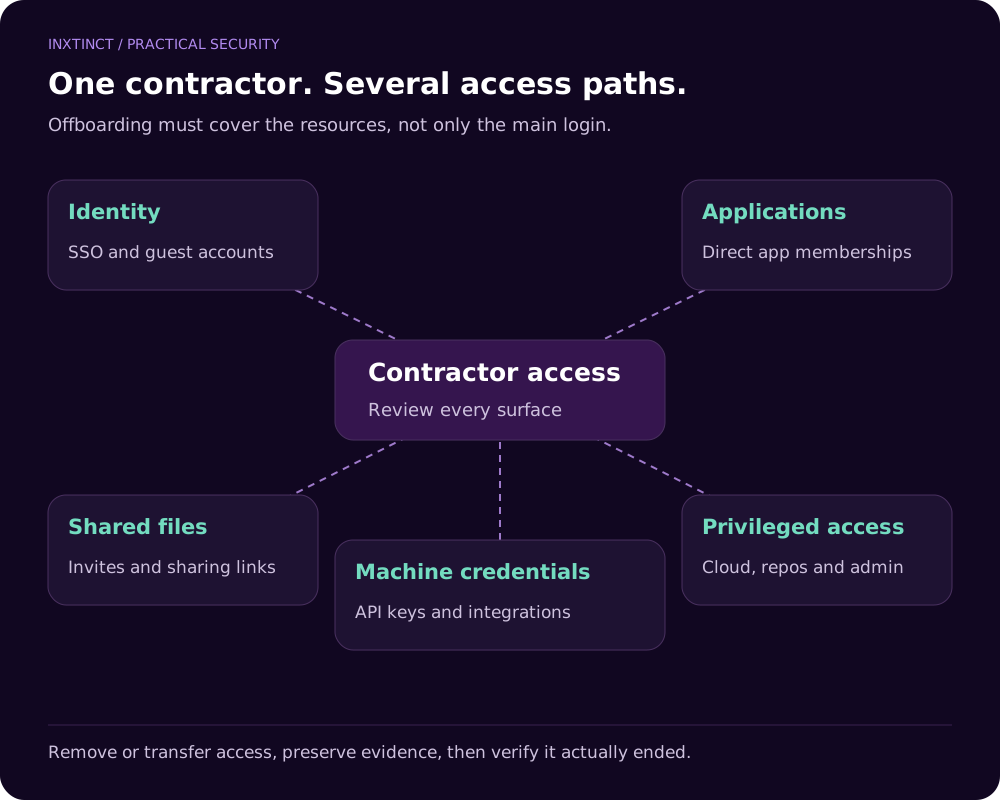
There may be several access paths: a named guest account, a shareable link, a separate login to a design tool, a connected app, a service account created during the project or an administrator role granted temporarily and never revoked.
An external person's company email address may be the easiest thing to search for, but it won't reveal every shared link or non-human credential. That is why a useful access review starts with both identities and resources.
The NCSC's SaaS guidance recommends joiner, mover and leaver processes for external as well as internal users. It also stresses revocable, controlled sharing and visibility over who has been given access.
Start with a contractor access inventory
Record who the contractor is, which organisation they belong to, which systems were approved, the business owner, the expiry or review date and how access will be removed. If you're doing this after the project has ended, reconstruct the list from onboarding records and application logs.
You may find several types of access:
- Organisation-level identity: Microsoft Entra, Google Workspace or another single-sign-on provider.
- Application membership: CRM, design, support, analytics and project management tools.
- File and document sharing: guest permissions, direct invitations and links.
- Privileged access: cloud consoles, repositories, deployment tools and security administration.
- Machine access: tokens, API keys and integrations established for automated work.
Don't assume revoking the identity provider session removes a token issued elsewhere. Check each system's revocation and lifecycle behaviour.
Six practical checks
1. Find the resources, not just the person
Ask which files, groups, folders and environments were involved. A guest account that can sign in but has no live access is a different risk from an expired contractor who still owns a production service integration.
2. Review externally shared links
Links can be granted to named recipients, anyone in an organisation or anyone who possesses the link, depending on the service configuration. Review both the sharing mode and whether the link is still necessary.
3. Remove privilege before cleaning up ordinary access
Administrator rights and access to production secrets deserve priority. Confirm who approved the original role and whether other staff rely on a shared account. Avoid deleting an account blindly if doing so would break a legitimate system; transfer ownership and rotate credentials first.
4. Check app and automation permissions
Cloud platforms may permit third-party integrations and tokens that continue working after a person leaves. Review the application's consent, service principal or equivalent integration identity and its granted scopes. Determine whether the automation is still needed.
5. Preserve the right evidence
Record the access review and actions taken, especially where customer contracts or compliance requirements expect traceability. Avoid exporting more personal or confidential information than the investigation requires.
6. Confirm access actually ended
After revocation, verify that the identity cannot reach the intended resources. Where relevant, check active sessions, inherited group membership and separate application accounts. Closing a ticket is not the same as confirming the control worked.
A practical quarterly access review
For a small organisation, don't begin with a spreadsheet of every permission in the company. Begin with high-risk systems: customer data, finance, source code, cloud administration and sensitive shared folders. Ask the business owner to review external access and privileged identities.
Create exceptions with an owner and an expiry date rather than allowing permanent access “until somebody asks for it to be removed”. Automate reminders where possible, but still give managers a reason to review the access they approve.
Why a blanket sharing ban usually fails
Teams need to collaborate with customers and specialists. If the official tools make that impossible, they may move the work to an unmanaged service. The NCSC's cloud guidance explicitly recognises this trade-off: controlled, visible sharing can be safer than unrealistic restrictions that people work around.
The right outcome is not zero sharing. It is sharing that is justified, limited and removable.
What to do when you discover old access
First confirm whether the person or integration still needs access. Then prioritise privileged, sensitive and externally exposed resources. Revoke what is unnecessary, rotate affected credentials when appropriate and document the action. If logs suggest misuse or data access outside the agreed purpose, move from routine cleanup to your incident response process.
Inxtinct's cloud and security consultancy can help map these access paths, review sharing settings and establish a process that does not depend on somebody remembering a contractor six months later.