
AI & Workplace Security
Your employees are already using ChatGPT at work. What should they never paste into it?
Inxtinct Editorial Team · Aug 31, 2026 · 6 min read

A colleague has forty pages of customer notes to summarise before a meeting. They could spend an hour reading them or paste the file into an AI assistant and get a summary in a minute. The second option is attractive for perfectly understandable reasons.
Now imagine the notes include customer contact details, an unfinished commercial proposal and an internal discussion about pricing. The problem is not the act of asking a model to summarise text. It is that the organisation may have no idea which service received that information, what agreement governs its use or whether it should have been sent in the first place.
A useful workplace AI policy begins with the data, not a blanket ban on AI. Here is how to make that distinction in practical terms.
Start by asking what the employee is sharing
A prompt is not necessarily just a sentence. It can include an uploaded spreadsheet, a screenshot, meeting transcript, repository file, browser context or documents retrieved through an integration. Those inputs matter more than whether somebody typed the words “please summarise”.
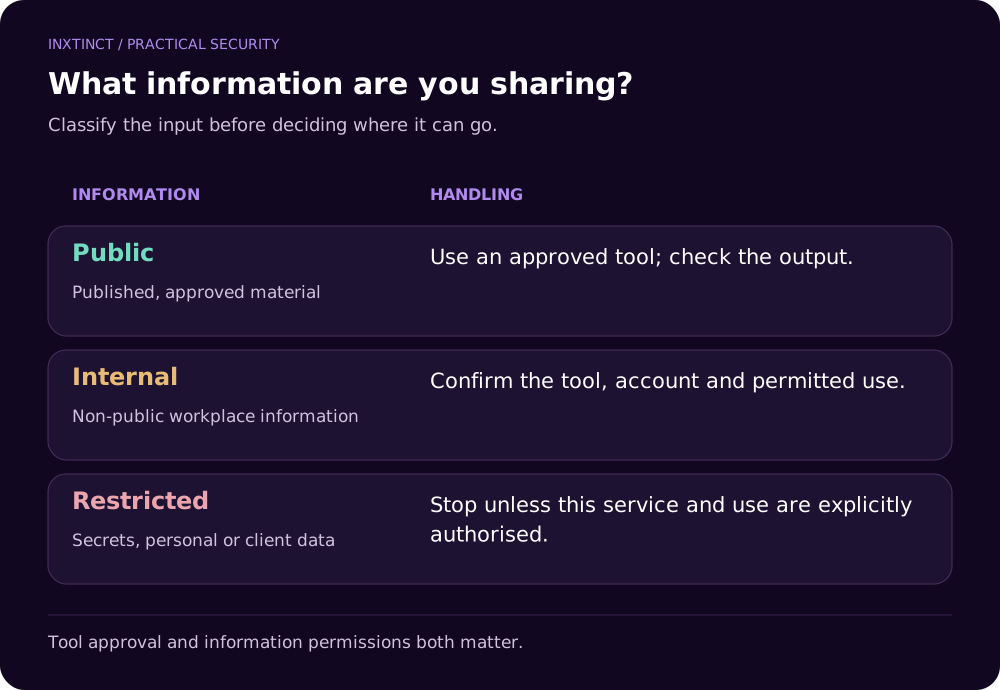
Before deciding whether an employee may use a particular service, classify what could be sent to it. A simple approach for a small team is to distinguish three groups:
- Public: already approved for public distribution, such as a published brochure or a public job description.
- Internal: operational notes, routine business discussions and material not intended for the public. Some uses may be permitted within an approved enterprise tool.
- Restricted: client personal data, non-public financial records, credentials, regulated information, security reports, private source code and commercially sensitive contracts. These need explicit rules and, in many cases, a different workflow.
This is an operational classification, not a substitute for your formal information-classification policy. A client contract may impose restrictions even if a document contains no personal data.
Five inputs to treat particularly carefully
1. Customer and employee personal information. A support transcript, CV or incident report might contain names, addresses, contact information or sensitive details. Removing names alone does not necessarily anonymise the material; combinations of other facts can still identify a person. The ICO's AI and data protection guidance explains that using AI does not remove ordinary accountability obligations.
2. Credentials and secrets. Passwords, API keys, private tokens and connection strings do not belong in prompts. If a secret has been shared, treat it as exposed and follow your rotation and incident procedures rather than assuming deleting a chat resolves the problem.
3. Non-public source code and architecture. Even when the developer's goal is to fix a harmless error, a pasted file may reveal business logic, internal endpoints, secrets or third-party intellectual property. Check the approved coding-assistant arrangement and repository permissions first.
4. Contracts and commercial negotiations. A pricing model, bid or unpublished customer agreement can create confidentiality issues without creating a personal-data issue. The right question is whether the information is authorised for this service and purpose.
5. Security investigations. Incident reports often combine personal information, technical weaknesses and details an attacker would value. Redact or use an approved restricted environment before asking for analysis.
“It doesn't train on our data” is not the entire answer
Marketing material often focuses on whether a vendor uses customer prompts to train a model. That is important, but it is only one part of supplier due diligence.
A company should also understand data retention, administrative access, subprocessors, regional processing arrangements where relevant, audit logs, deletion controls and whether content may be accessible through connected apps. A tool offered under an enterprise agreement can have materially different controls from a free consumer account. The settings can change, so check the current product documentation and your actual contract.
The ICO makes another useful distinction: complying with data protection law is not simply a matter of switching on a security setting. Organisations must consider lawful processing, transparency, purpose and minimisation in the way a tool is deployed.
Make the approved route easier than the unofficial one
A policy that says “never use AI for work” will be hard to enforce when teams genuinely need help drafting, coding and finding information. A more practical arrangement is an approved-tool register that explains what each service may be used for, what data it may handle and who can authorise exceptions.
A lightweight register can start with five columns: tool name, approved use, permitted information, owner and review date. Add conditions for connecting cloud storage or company accounts. If your organisation cannot explain why an assistant needs broad access to the shared drive, don't approve the integration by default.
Give people a safe alternative. For example, instead of uploading a customer spreadsheet, offer a synthetic sample or a properly minimised extract, provided it cannot identify individuals and the task permits it. Instead of pasting a complete repository, allow developers to use an approved coding assistant under defined controls.
What should an employee do before pressing Enter?
Use this short decision check:
- What exactly is leaving my device? Include attachments, screenshots and connected files.
- Do I have permission to share it? Consider customer agreements and internal classification, not just whether it's personal data.
- Is this an approved account and tool? A company login alone is not evidence of approval.
- Could I achieve the task with less information? Remove irrelevant details or use an approved sample.
- Who will check the answer? AI output can be inaccurate or omit a crucial condition.
If any answer is unclear, the employee should know whom to ask. Security decisions made under time pressure need a simple escalation route.
What managers should put in place this month
Start with a short discovery exercise rather than an elaborate policy nobody reads. Ask each team which AI tools they actually use, for which tasks and with which accounts. You are looking for normal practices, not trying to catch people out.
Next, choose a small set of approved use cases. Agree on restricted data, require appropriate vendor review, review integrations and document who owns exceptions. Train people on concrete examples: a customer file, an invoice, a code fragment and a meeting transcript. Ask them whether each is safe to share and why.
Finally, set a review date. A policy written before a new file-search or agent capability was introduced may no longer describe what the product can access.
The key distinction: “Can the AI tool do this?” and “Are we allowed to give it this information?” are different questions.
This is an area where Inxtinct's security consultancy and cyber awareness workshops can work together: review the tools and controls, then give employees practical rules they can use during the working day.