
AI & Workplace Security
How to write an AI usage policy employees will actually follow
Inxtinct Editorial Team · Oct 12, 2026 · 5 min read

Most AI usage policies sound reasonable until someone has to make a decision with them.
“Employees must protect confidential information and use AI responsibly” is hard to disagree with. It is also nearly useless when an account manager wants to summarise a customer call, a developer needs help debugging code or somebody has installed an assistant that can search the company drive.
A usable policy must answer questions at the point of work. Which tools are approved? What information may be entered? Who checks the output? What happens when somebody is unsure?
This article offers a policy structure rather than a ready-made legal document. Adjust it to your contracts, industry and applicable law.
Begin with the tasks people already perform
Don't start by listing every AI model on the market. Start with a short conversation with the people who use them. Ask what they're trying to achieve, which accounts they use, whether they upload files and whether the tools are connected to company systems.
The aim is to make the good workflow visible. Some teams may need AI for drafting and summarisation; others use it to navigate code or categorise support requests. The risk differs with the data, access and action involved.
An AI usage policy that permits ordinary drafting but ignores connected apps will become outdated quickly. An assistant that can read a document is different from an agent that can send emails, change records or create tickets.
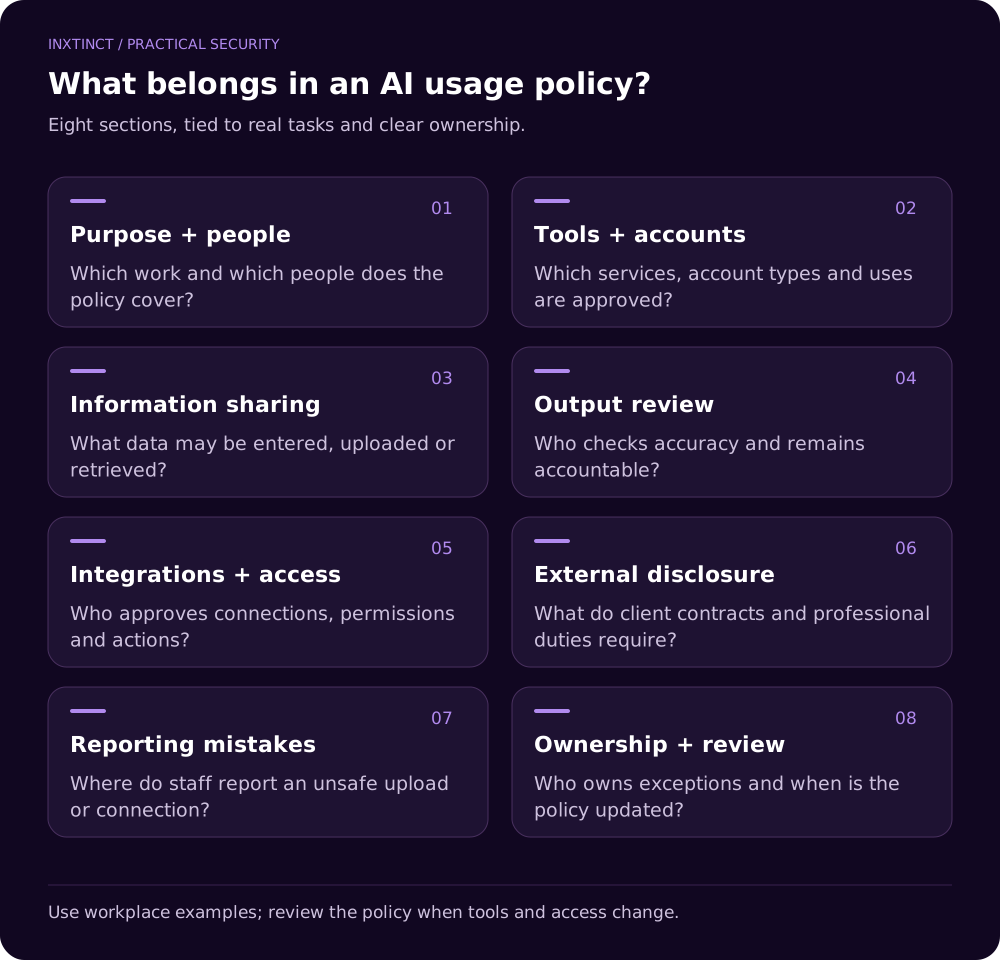
The eight parts of a useful policy
1. Purpose and who it covers
Explain that the policy applies to employees, contractors and others using AI for the business. Say which categories of tools it covers: chat assistants, transcription services, code assistants and integrated agents. State that higher-priority contractual and legal requirements still apply.
Example wording: “Use AI tools for work only through approved accounts and approved use cases. If a tool is not listed, seek approval before using it with company information.”
2. Approved tools and account types
Maintain a living register with the service, owner, approved account type and permitted uses. Where a consumer and enterprise version have different controls, list them separately. Don't assume signing in with a work email makes a service approved.
3. Information that may be shared
Use your actual information-classification scheme. A sample public press release may be suitable for drafting practice; a customer contract or repository secret is a different matter. Employees should know whether they can share internal documents, personal information and source code.
Example wording: “Do not enter credentials, restricted personal information, customer-confidential documents or non-public source code into an AI service unless the specific service and use are authorised.”
4. Output review and accountability
Make clear that generated material is a draft or input to a decision, not proof of accuracy. Identify when a human must verify facts, legal statements, calculations, code or customer-facing advice.
5. Integrations and permissions
Require approval before connecting an assistant to mailboxes, file repositories, customer records or production systems. Review the permissions requested and whether read-only access would be sufficient. Where agents can take actions, define approval and logging requirements.
6. External communication and disclosure
If employees produce customer deliverables with AI, clarify any contractual or professional obligations to disclose its use. Don't invent a universal disclosure rule; determine the requirement from the actual work and relationship.
7. Reporting mistakes
Give employees a clear action when they paste something they shouldn't have, connect the wrong system or notice an unsafe output. The fastest path should be contacting a named team without fear of being publicly blamed.
Example wording: “If restricted information is accidentally entered into an unapproved tool, report it promptly through [internal channel]. Do not attempt to resolve it solely by deleting the conversation.”
8. Ownership and review date
Name the policy owner and the group that approves new tools. Review the document when new integrations, features or material legal requirements appear, not only when the annual document-review reminder fires.
What a one-page employee summary might say
| Situation | Employee action |
|---|---|
| Drafting a public announcement | Use approved tool; check output |
| Summarising internal meeting notes | Confirm tool and data permissions |
| Uploading customer information | Stop unless explicitly approved |
| Debugging company source code | Use approved coding environment and review output |
| Connecting AI to shared drives | Request an access and supplier review |
| Unsure whether a task is allowed | Ask the named policy owner before sharing data |
This table is more useful during a busy day than a declaration that all employees must “exercise caution”. Link the full policy from it for exceptions and specialist rules.
How to roll it out without creating another ignored document
Choose three real decisions from your workplace and discuss them with employees. One should be an obviously prohibited action, one should be clearly allowed and one should need approval. Explain the reasons. People remember the boundaries better when they understand the trade-off.
Give managers the same examples. If a manager routinely tells staff to paste confidential information into a free AI service to save time, an employee-facing policy will not solve the organisational problem.
Then review your tools. A document can say that only approved apps are allowed, but a practical control also checks what is installed, connected and actually used. Policy and technical measures should reinforce each other.
Important UK data protection considerations
The ICO's AI guidance describes a risk-based approach to data protection, including accountability, transparency and data minimisation. Whether particular personal data can be processed through an AI service depends on the circumstances and the applicable lawful basis, contractual roles and safeguards.
A generic policy template cannot settle those questions for you. Have the relevant privacy or legal owner review use cases involving personal information.
Make the policy genuinely useful
At Inxtinct, we approach AI security consultancy and workplace awareness training together. A usable policy tells employees what to do; good training helps them recognise the moment when the policy applies. One without the other leaves a gap.