
Cybersecurity
The Browser Extension You Installed Six Months Ago Is Still Watching You
Deepanjan Paul · Apr 17, 2026 · 4 min read

In January 2021, Google quietly removed an extension called The Great Suspender from the Chrome Web Store. It had over two million active users. People had installed it in good faith. It was a genuinely useful tool that freed up memory by suspending inactive browser tabs.
What those two million users didn't know: the original developer had sold the extension months earlier to an anonymous buyer, who promptly pushed an update containing hidden malware. The extension had been sitting in their browsers for months. Trusted, forgotten, never revisited. It had become something else entirely.
Google removed it. The damage was already done.
The most overlooked attack surface on your device
Ask most people where security threats come from and they'll say: dodgy websites, phishing emails, sketchy downloads. Almost nobody says browser extensions.
They should.
Extensions sit inside your browser with a level of access that most people would find alarming if they ever stopped to read the permissions. "Read and change all your data on all websites you visit" is the most common permission granted to Chrome extensions. It means the extension can see every page you load, every form you fill in, every password field, even before you submit it.
Most extensions that request this permission are legitimate and use it responsibly. But "most" is doing a lot of heavy lifting in that sentence.
You don't always know when the rules change
The Great Suspender wasn't an isolated incident. In 2019, a security researcher discovered that eight popular Chrome extensions, collectively installed by over four million users, were quietly harvesting browsing data and sending it to a third-party server. The extensions were legitimate tools: a document converter, a screenshot tool, a productivity app. None of them had started out malicious.
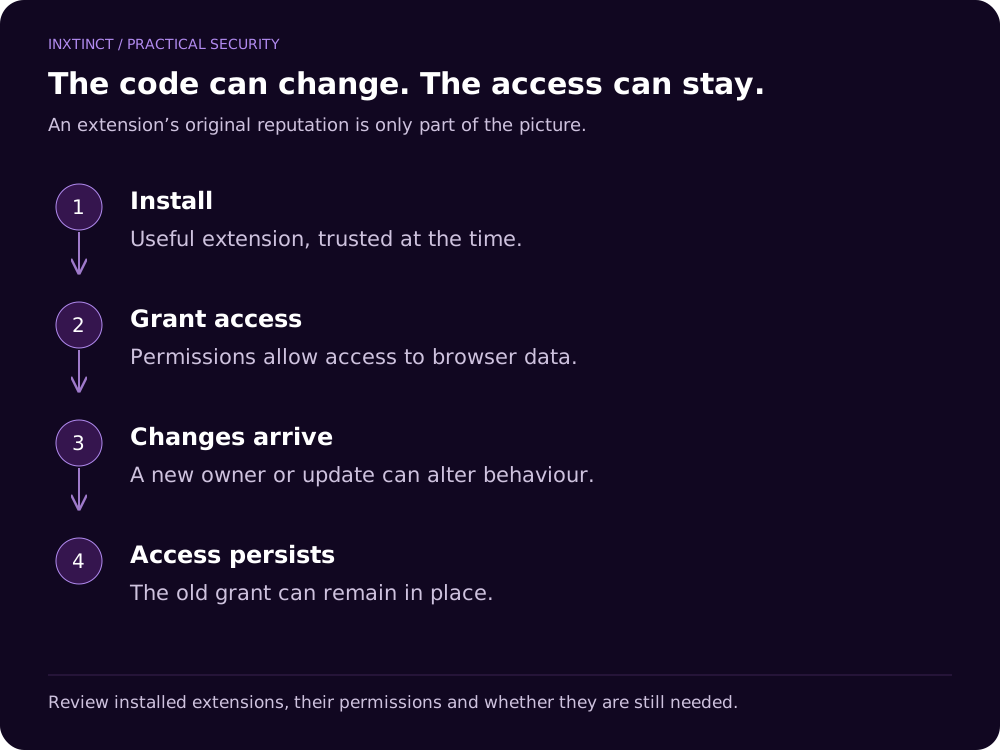
This is the supply chain problem that the security industry rarely explains clearly to consumers: an extension you installed two years ago, reviewed, and trusted, can become something different tomorrow. Developers sell their extensions. Companies get acquired. Maintainers abandon projects and hand them to strangers. Each of these events is a potential transfer of access to your browser, and you won't get a notification when it happens.
The Chrome Web Store doesn't require extensions to disclose ownership changes. The extension just updates silently, like it always has, and you carry on with your day.
Your antivirus isn't looking here
Here's something that surprises most people: traditional antivirus software doesn't scan browser extensions. It operates at the file system level, scanning for known malware signatures in downloaded files, executables, and system processes. Extensions live inside the browser's own sandbox, in a format and location that most security tools aren't designed to inspect.
This means the standard advice about keeping your antivirus updated and avoiding unknown downloads doesn't protect you here. You can have a fully patched system, a premium security suite, and a browser full of extensions that are exfiltrating your session tokens to a server in another country. The antivirus won't know. Neither will you. Security tools built specifically for the browser, like Inxtinct One, take a different approach — scanning extension behaviour from inside the browser itself, where the threat actually lives.
What session hijacking actually looks like in practice
One of the more valuable things a compromised extension can do is steal session tokens. These are the small pieces of data that tell a website you're already logged in. Unlike passwords, session tokens don't require two-factor authentication to use. If someone has your session token for Gmail, they're in your Gmail. Right now. No password needed.
This isn't theoretical. In 2023, a wave of YouTube creators had their channels hijacked via exactly this method. Malware delivered through fake collaboration emails stole session cookies from their browsers. Within hours, channels with millions of subscribers were being used to broadcast cryptocurrency scams. The creators hadn't clicked a suspicious link. They hadn't ignored a security warning. They'd just had their session stolen from inside a browser they thought was secure.
Extensions are one of the most efficient ways to achieve this at scale.
The audit nobody does
Open Chrome. Go to chrome://extensions. Look at what's there.
Most people find at least one extension they don't remember installing, several they haven't used in over a year, and a few they couldn't describe the purpose of without clicking on them. Every one of those is a potential entry point. Not necessarily malicious right now, but a surface that exists, persists, and has permissions it was granted a long time ago under different circumstances.
The industry solution to this has historically been: audit your extensions manually, read the permissions carefully, remove anything you don't use. This is sound advice that almost nobody follows, because it requires technical knowledge most people don't have and attention that busy people can't spare.
The more honest answer is that the permissions model was designed for developers, not users. Asking consumers to make informed security decisions based on a single line like "Read and change all your data on websites you visit" is asking them to interpret legalese under time pressure, when all they wanted was to convert a PDF.
The browser extension ecosystem put enormous trust in users to police it themselves. That was always going to be a problem.
Inxtinct One scans every extension in your browser for hidden tracking scripts and malicious behaviour, flagging threats before they ever touch your data. You shouldn't need to become a security expert to use the internet safely.